Watch your Cursor agent conversations work — a live office, in real time.
0.0 · No ratings 1 0
Install
code --install-extension <file>.vsix
Copies a short prompt — paste it into Cursor (or another AI agent) to set this up for you.
Guidance
Cursor Theater turns the conversations Cursor keeps for you into a glance: which projects have agents working, idle, or finished, and what each is doing right now.
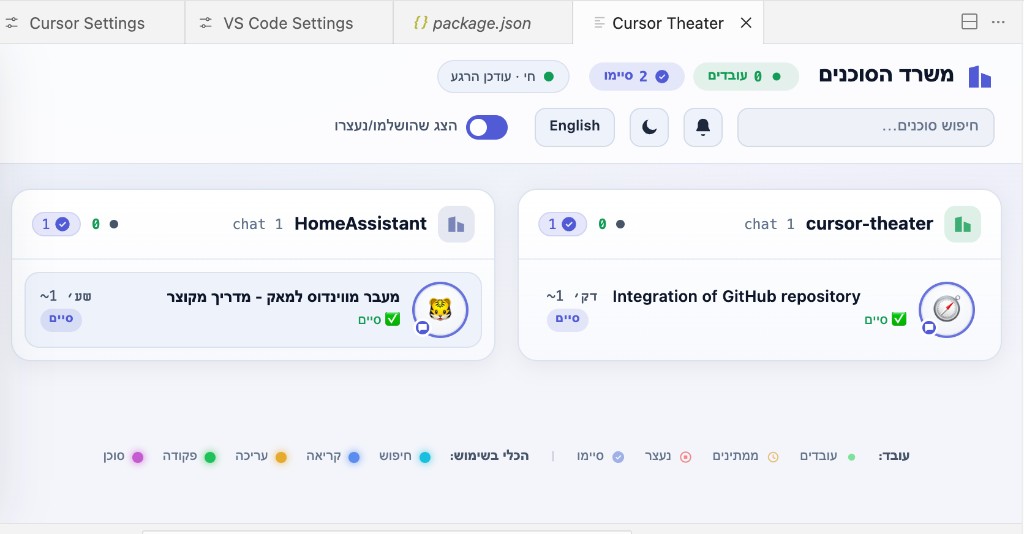
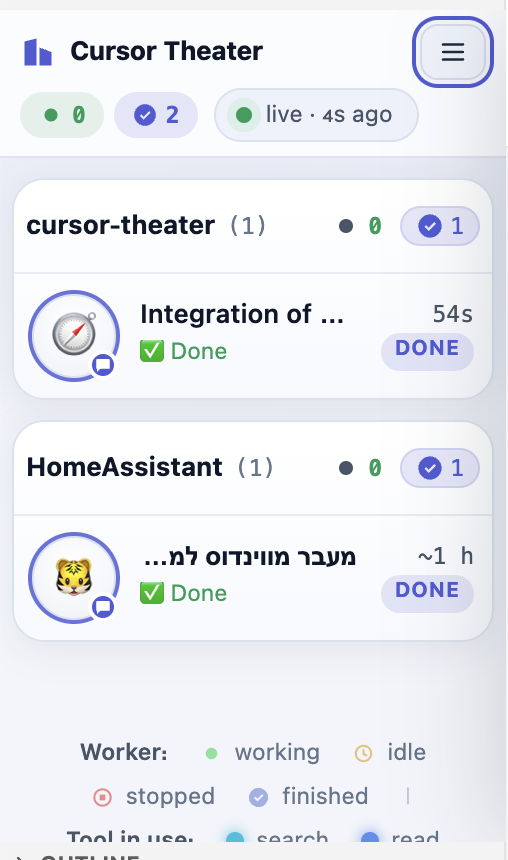
Groups conversations per Cursor instance/project (a "room"); each conversation is a character at a desk with avatar, title, current tool, and a timer.
Real chat titles, status, and timestamps (from Cursor's state.vscdb).
Status-bar item with a live count of working agents.
Bilingual UI (English / Hebrew with RTL).
Safe by design: runs entirely locally, only reads your journals, opens no port, sends no telemetry. Port of Claude Theater by Asaf Abramzon.
Install: grab the latest .vsix from Releases → code --install-extension <file>.vsix.
Watch your Cursor agent conversations work — a live office, in real time.
Each Cursor instance/project is a room; every conversation inside it is a character at a desk — avatar, title, the tool it's using, and a timer. A community visualizer for Cursor — not affiliated with Anysphere.
Cursor Theater turns the conversations Cursor keeps for you into a glance: which
projects have agents working, which are idle, which finished, and what
each one is doing right now — without digging through transcripts.
It's a port of the excellent Claude Theater
by Asaf Abramzon, re-pointed at Cursor's data and shipped as a native, server-less
Cursor extension.
Safe by design: it runs entirely on your machine, only reads your local
journals, and sends nothing anywhere (no telemetry). The extension opens no port at
all. (more)
What it looks like
Cursor Theater groups conversations per Cursor instance / project (a room), with
each conversation shown as a character at a desk. It works full-width in an editor
tab and stays readable docked in a narrow side bar.
Real chat titles, status, and timestamps (pulled from Cursor's state.vscdb).
Per-room show-finished toggle and a bottom list of hidden, fully-finished rooms.
A with a live count of working agents — click for a quick menu.
Bilingual UI: English by default, Hebrew one click away (layout flips to RTL).
Install (Cursor extension — recommended)
The extension runs no HTTP server and opens no port: it reads
~/.cursor/projects and Cursor's global state.vscdb directly, watches them for
changes, and pushes updates into a webview.
Install the prebuilt .vsix — download cursor-theater-<version>.vsix from the
latest release, then in
Cursor run Extensions: Install from VSIX…, or from a terminal:
After installing you get an Activity Bar view, a dockable side-bar view, a
status-bar item (bottom-right), and a full editor-tab command
(Cursor Theater: Open in Editor).
Or build it from source (needs Node.js):
git clone https://github.com/udah1/cursor-theater
cd cursor-theater/extension
npm install
npm run package        # produces cursor-theater-<version>.vsix
cursor --install-extension cursor-theater-*.vsix
Standalone Python server (optional)
The extension is the primary path, but the original single-file Python server is
kept for two things the in-editor extension can't do:
View it in a real browser — a browser tab can't read your transcripts, so it
needs an HTTP source; the server provides one (the shared UI auto-switches to
fetch('/api/agents') when it isn't running inside a webview).
Live UI development — it serves ui/theater.html fresh on every request, so
you can edit the UI and just refresh the browser.
python3 cursor_theater.py            # scans ~/.cursor and opens http://localhost:7333
python3 cursor_theater.py --demo     # synthetic office, no sessions needed
Requires Python 3.9+. Binds to 127.0.0.1 only and is read-only.
How it works
The extension scans ~/.cursor/projects/**/*.jsonl transcripts and reads chat
titles/status/timestamps from Cursor's global state.vscdb via the read-only
sqlite3 CLI (json_extract, indexed — never loads the whole DB into memory). It
degrades gracefully (first message + file mtime) if sqlite3 is unavailable.
The UI is a single source of truth at ui/theater.html. The Python server
inlines it (build_ui.py) and the extension bundles it (npm run copy-ui), so
both front ends render the exact same page.
No server in the extension: data is pushed into the webview via postMessage.
Each Cursor window runs its own extension host, so opening the theater in several
windows is safe and independent — closing one never affects another.
Privacy
Your journals contain real conversation content, so Cursor Theater keeps them local:
The extension opens no port and makes no network calls.
The optional Python server binds to 127.0.0.1 only and is read-only, with a
loopback Host allowlist that blocks DNS-rebinding and a strict CSP.
No telemetry, ever.
Develop
# extension
cd extension && npm install && npm run compile   # then press F5 for an Extension Dev Host

# UI: edit ui/theater.html, then refresh the Python server in the browser.
# After a UI change, sync both consumers:
python3 build_ui.py        # inline into cursor_theater.py
cd extension && npm run copy-ui
Note: the Python server and the extension have separate scan implementations
(cursor_theater.py vs extension/src/scan.ts). If you change status/liveness
logic, update both.